UIC324H 5000VDC Fully Isolated USB to RS485 Adapter
UIC324H 5000VDC Fully Isolated USB to RS485 Adapter based on CP2102N, supports baud rates up to 3 Mbps, ±30kV ESD protection, industrial-grade design.
# UIC324H — 5000VDC Fully Isolated USB to RS485 Adapter
## Product Overview
The UIC324H is a highly reliable USB-to-RS485 adapter featuring full isolation between the RS485 port and the USB interface. Built around the Silicon Labs CP2102N chipset — one of the most robust and compatible serial conversion chips available — it ensures broad operating system compatibility, including with Windows, Linux (kernel 3.0.0-19 and above), macOS 8 and above, and Android.
This adapter provides **5000 VDC isolation** for both power and data lines, supporting data rates up to **3 Mbps**. It also includes strong ESD protection on the TX and RX pins: **±8 kV** for contact discharge and **±15 kV** for air gap discharge (IEC 61000-4-2 Level 4 up to 30 kV). This makes it an excellent safeguard for both your USB port and connected serial devices against voltage spikes, static discharge, and transient surges.
Designed for industrial environments, this adapter performs reliably in electrically noisy conditions and where RS485 cables are frequently connected and disconnected. The durable cast metal enclosure offers added mechanical protection, and the unit draws power directly from the USB port — no external power supply required.
---
## Features
:::grid{cols=2 style=card}
**Isolated RS485 Interface**
- 5000 VDC full isolation (power + signal)
- Flip-clip paired connector, 2×2 pin
- Isolated A, B and GND (optional)
- Baud rates up to 3 Mbps
**ESD Protection**
- TX/RX: ±8 kV (contact)
- IEC 61000-4-2: 30 kV (Level 4)
- MIL-STD-883 3015.7: 30 kV
:::
:::grid{cols=2 style=card}
**USB Interface**
- USB 2.0 full-speed (12 Mbps)
- USB-powered, no external power needed
- Emulates standard COM port
- Broad OS support (Win/Linux/macOS/Android)
**Industrial Design**
- Cast aluminum alloy enclosure
- Cable length: 1 ft (30 cm)
- Operating temp: -40°C to +85°C
- Weight: 30 g
:::
---
## Specifications
### General Information
| Parameter | Specification |
|-----------|---------------|
| Part Number | UIC324H |
| Operating System | Windows (32/64-bit), Linux (kernel 3.0.0-19+), macOS 8+, Android |
| USB Connector | Type A, Cast Aluminum Alloy |
| USB Compliance | USB 1.1 / 2.0 |
| Power | From USB port (no external power required) |
### RS485 Interface
| Parameter | Specification |
|-----------|---------------|
| Connector | Flip-clip paired connector, 2×2 pin |
| Isolation | 5000 VDC (power + signal) |
| Signals | Isolated A, B and GND (optional) |
| Baud Rates | 300, 600, 1200, 1800, 2400, 4000, 4800, 7200, 9600, 14400, 16000, 19200, 28800, 38400, 51200, 56000, 57600, 64000, 76800, 115200, 128000, 153600, 230400, 250000, 256000, 460800, 500000, 576000, 921600, 1M, 1.2M, 1.5M, 2M, 3M bps |
| Data Bits | 5, 6, 7, 8 |
| Stop Bits | 1, 1.5, 2 |
| Parity | None, Odd, Even, Mark, Space |
### ESD Protection
| Parameter | Specification |
|-----------|---------------|
| TX / RX Pins | ±8 kV (contact) |
| IEC 61000-4-2 (Direct discharge) | 30 kV (Level 4) |
| IEC 61000-4-2 (Air discharge) | 30 kV (Level 4) |
| MIL-STD-883, Method 3015.7 | 30 kV |
### Mechanical & Environmental
| Parameter | Specification |
|-----------|---------------|
| Enclosure | Aluminum |
| Cable Length | 1 ft (30 cm) |
| Weight | 30 g |
| Operating Temperature | -40°C to +85°C |
| Operating Humidity | 5% to 85% RH |
| Warranty | 1-year limited warranty |
---
## Wiring
### Wire Color Code
| Color | Signal | Description |
|-------|--------|-------------|
| White | A | RS485 A (non-inverting) |
| Green | B | RS485 B (inverting) |
| Black | GND | Signal ground (optional) |
### Terminal Resistor
For long-distance RS485 networks, a 120Ω termination resistor should be connected between the A and B lines at both ends of the bus.
### Connection Diagram
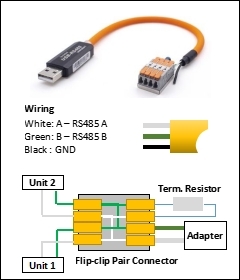
> **Note**: RS485 uses differential signaling for long-distance communication. Connect A to A and B to B. The GND connection is optional but recommended for longer cable runs.
---
## Quick Start
1. Connect the UIC324H to your computer via USB
2. Install the CP2102N driver (if not automatically recognized)
3. Connect the RS485 wires to your device (A → A, B → B)
4. Open a serial terminal (e.g., PuTTY, Serial Monitor)
5. Select the correct COM port and baud rate
6. Communication is ready
---
## Safety Precautions
### Electrical Safety
| Hazard | Precaution |
|--------|------------|
| Isolation Voltage | Do not exceed 5000 VDC isolation rating. Ensure proper grounding. |
| ESD | Use anti-static precautions when handling. Discharge static before touching connectors. |
| Power Supply | The device is USB-powered. Ensure the USB port can supply sufficient current. |
### Operational Safety
| Hazard | Precaution |
|--------|------------|
| Operating Temperature | Use within -40°C to +85°C range. |
| Humidity | Keep within 5% to 85% RH. Do not use in condensing environments. |
| Cable Strain | Avoid sharp bends or pulling on the USB cable. |
---
## Downloads
- 📖 [UIC324H Datasheet V5.08 (PDF)](https://www.uirobot.com/uploads/files/Manual_UIC324H%20V5.08.pdf)
- 💻 [CP2102N USB Driver](https://www.silabs.com/developers/usb-to-uart-bridge-vcp-drivers)
---
## Related Documents
- [UIC320A USB to UART (TTL) Adapter](/docs/uic320a)
- [UIC321H USB to RS232 Adapter](/docs/uic321h)
- [Quick Start Guide](/docs/quick-start)
---
*Last updated: 2026-06-25 | Based on Datasheet V5.08*