UIC320A High-Speed USB to UART (TTL) Adapter
UIC320A High-Speed USB to UART (TTL) Adapter based on CP2102N, supports baud rates up to 3 Mbps, 5V/3.3V TTL, industrial-grade cast metal enclosure.
# UIC320A — High-Speed USB to UART (TTL) Adapter
The UIC320A is a reliable USB-to-UART (TTL) adapter that bridges a computer's USB port with devices using TTL serial communication. In addition to serving as a standard USB-to-UART adapter, it can be used to configure the UIM344 serial closed-loop motor, or as a programmer for Arduino boards — particularly those without a built-in USB-to-serial converter (e.g., Arduino Pro Mini, Arduino Nano).
Powered by the Silicon Labs CP2102N chipset — renowned for its robustness and compatibility — it offers seamless support for major operating systems, including Windows, Linux, macOS, Arduino, and Android.
Engineered for industrial environments, the UIC320A operates reliably even in electrically noisy conditions. Its durable cast-metal enclosure provides mechanical protection, while the adapter draws power directly from the USB port, eliminating the need for an external power supply.
---
## Features
:::grid{cols=2 style=card}
**High-Speed UART**
- Baud rates: 300 bps to 3 Mbps
- 5V and 3.3V TTL support
- Data bits: 5, 6, 7, 8
- Stop bits: 1, 1.5, 2
- Parity: None, Odd, Even, Mark, Space
**Industrial Design**
- Cast metal alloy enclosure
- USB 2.0 full-speed (12 Mbps)
- USB-powered, no external power needed
- Flip-clip connector for easy wiring
:::
:::grid{cols=2 style=card}
**Broad Compatibility**
- Windows (32/64-bit)
- Linux (kernel 3.0.0-19+)
- macOS 8+, Android
- Arduino IDE support
**ESD Protection**
- TX/RX: ±8 kV
- IEC 61000-4-2 Level 4: 30 kV
- MIL-STD-883 3015.7: 30 kV
:::
---
## Applications
- **USB to UART (TTL) Adapter** — Connect computers to TTL serial devices
- **UIM344 Configuration Tool** — Configure UIM344 serial closed-loop motors via CFG344 software
- **Arduino Programmer** — Program Arduino boards without built-in USB (Pro Mini, Nano, etc.)
---
## Specifications
### General Information
| Parameter | Specification |
|-----------|---------------|
| Part Number | UIC320A |
| Operating System | Windows (32/64-bit), Linux (kernel 3.0.0-19+), macOS 8+, Android |
| USB Connector | Type A, Cast Aluminum Alloy |
| USB Compliance | USB 1.1 / 2.0 |
| Power | From USB port (no external power required) |
### UART Interface
| Parameter | Specification |
|-----------|---------------|
| Connector | Flip-clip connector, 4-pin |
| Signals | DTR, TX, RX, GND |
| Baud Rates | 300, 600, 1200, 1800, 2400, 4000, 4800, 7200, 9600, 14400, 16000, 19200, 28800, 38400, 51200, 56000, 57600, 64000, 76800, 115200, 128000, 153600, 230400, 250000, 256000, 460800, 500000, 576000, 921600, 1M, 1.2M, 1.5M, 2M, 3M bps |
| Data Bits | 5, 6, 7, 8 |
| Stop Bits | 1, 1.5, 2 |
| Parity | None, Odd, Even, Mark, Space |
### ESD Protection
| Parameter | Specification |
|-----------|---------------|
| TX / RX Pins | ±8 kV |
| IEC 61000-4-2 (Direct discharge) | 30 kV (Level 4) |
| IEC 61000-4-2 (Air discharge) | 30 kV (Level 4) |
| MIL-STD-883, Method 3015.7 | 30 kV |
### Mechanical & Environmental
| Parameter | Specification |
|-----------|---------------|
| Enclosure | Aluminum |
| Cable Length | 1 ft (30 cm) |
| Weight | 25 g |
| Operating Temperature | -40°C to +85°C |
| Operating Humidity | 5% to 85% RH |
| Warranty | 1-year limited warranty |
---
## Wiring
### Wire Color Code
| Color | Signal | Description |
|-------|--------|-------------|
| Yellow | DTR | DTR signal to device |
| White | TX | Transmit data to device |
| Green | RX | Receive data from device |
| Black | GND | Signal ground |
### Connection Diagram
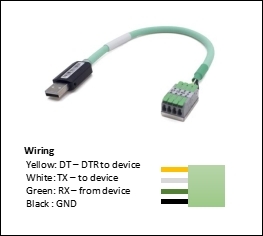
> **Note**: The UIC320A supports both 5V and 3.3V TTL logic levels. Ensure your device's logic level matches the adapter's output.
---
## Quick Start
1. Connect the UIC320A to your computer via USB
2. Install the CP2102N driver (if not automatically recognized)
3. Connect the UART wires to your device (TX → RX, RX → TX, GND → GND)
4. Open a serial terminal (e.g., PuTTY, Arduino Serial Monitor)
5. Select the correct COM port and baud rate
6. Communication is ready
### UIM344 Configuration
```bash
# Connect UIC320A to UIM344 motor, then open CFG344 tool
# Select the COM port assigned to UIC320A
# Configure motor parameters via CFG344 GUI
```
### Arduino Programming
```cpp
// 1. Connect UIC320A to Arduino board (TX→RX, RX→TX, GND→GND)
// 2. In Arduino IDE: Tools → Board → Select your board
// 3. Tools → Port → Select UIC320A COM port
// 4. Upload sketch
```
---
## Safety Precautions
### Electrical Safety
| Hazard | Precaution |
|--------|------------|
| ESD | Use anti-static precautions when handling. Discharge static before touching connectors. |
| Power Supply | The device is USB-powered. Ensure the USB port can supply sufficient current. |
| Voltage Level | Verify the target device's logic voltage (3.3V or 5V) before connecting. |
### Operational Safety
| Hazard | Precaution |
|--------|------------|
| Operating Temperature | Use within -40°C to +85°C range. |
| Humidity | Keep within 5% to 85% RH. Do not use in condensing environments. |
| Cable Strain | Avoid sharp bends or pulling on the USB cable. |
---
## Downloads
- 📖 [UIC320A Datasheet V5.10 (PDF)](https://www.uirobot.com/uploads/files/Manual_UIC320A%20V5.10.pdf)
- 💻 [CP2102N USB Driver](https://www.silabs.com/developers/usb-to-uart-bridge-vcp-drivers)
---
## Related Documents
- [UIM344 Pulse & Direction Stepper Motor Controller](/docs/uim344)
- [Quick Start Guide](/docs/quick-start)
- [Arduino CAN Bus Examples](/docs/arduino-examples)
---
*Last updated: 2026-06-25 | Based on Datasheet V5.10*