STC89C52 CAN Bus Examples
Complete STC89C52 code examples for UIROBOT products — CAN bus control via UIM2513 gateway. Includes Keil uVision5 setup, wiring, and code.
This page provides complete **STC89C52** microcontroller example projects for controlling UIROBOT motors via CAN bus using the **UIM2513** RS232-to-CAN gateway.
---
## Quick Selection
| Connection Method | Compatible Products | Docs |
|-----------------|-------------------|------|
| **STC89C52 → UIM2513 → CAN Bus** | UIM342 (single motor) | [AN250915] |
| **STC89C52 → UIM2513 → CAN Bus** | UIM342 (change Node ID) | [AN250916] |
| **STC89C52 → UIM2513 → CAN Bus** | UIM342 (multiple motors) | [AN250917] |
---
## Background
The UIM342 is a high-performance integrated stepper motor driver designed for applications requiring precise motion control. The UIM2513 is an RS232-to-CAN gateway. By combining an **STC89C52** microcontroller, the **UIM2513** gateway, and **UIM342** motor drivers, users can efficiently create a powerful motion control system using the classic 51 MCU platform.
This application manual provides step-by-step instructions for controlling UIM342 motors using STC89C52 and UIM2513.
---
## Required Hardware
| Item | Qty | Description |
|------|:---:|-------------|
| STC89C52 Development Board | 1 | 51 MCU development board |
| UIM2513 | 1 | RS232 to CAN gateway |
| UIM342 Series Motor | 1+ | CAN bus smart motor |
| 24V DC Power Supply | 1 | For motor power |
| USB-TTL Converter | 1 | For programming STC89C52 |
| RS232-TTL Converter | 1 | For UART communication |
| Keil uVision5 | 1 | IDE (install on PC) |
| STC-ISP Tool | 1 | Program download tool |
---
## Wiring
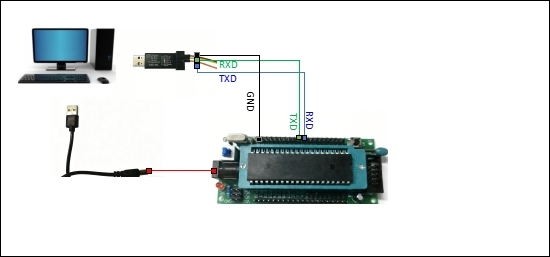
### Wiring Diagram 1 — Code Download Mode
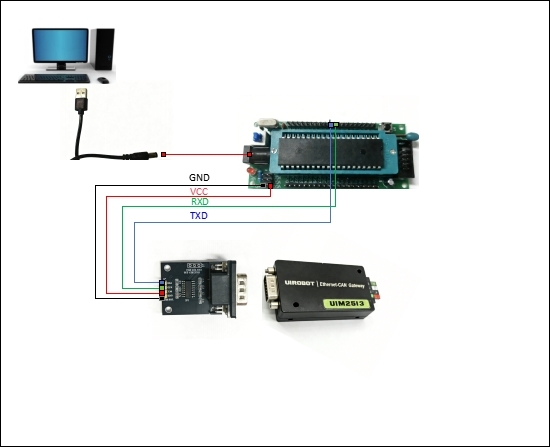
### Wiring Diagram 2 — System Operation Mode
### Communication Flow
```
STC89C52 (UART/TTL)
│ TXD/RXD
▼
UIM2513 (RS232 → CAN Gateway)
│ CANH/CANL
▼
UIM342 Motor (CAN Bus)
```
---
## Sample Code
### Download Links
| Application Note | Description | Download |
|-----------------|-------------|----------|
| AN250915 | UIM342 basic control (STC89C52) | [Download](https://www.uirobot.com/uploads/files/STC89C52_C_UIM2513_UIM342_AN250915.zip) |
| AN250916 | UIM342 change Node ID | [Download](https://www.uirobot.com/uploads/files/STC89C52_C_UIM2513_UIM342_ChangeNodeID_AN250916.zip) |
| AN250917 | UIM342 multi-motor control | [Download](https://www.uirobot.com/uploads/files/STC89C52_C_UIM2513_UIM342_Multiple_AN250917.zip) |
> **Note**: The actual sample code is provided in the ZIP files above. The code snippet above illustrates the general structure.
---
## Step-by-Step Setup
### Step 1 — Install Keil uVision5
1. Visit the official Keil website: [keil.com](https://www.keil.com/)
2. Navigate to **Downloads → Product Downloads → MDK Arm**
3. Download and install Keil uVision5
### Step 2 — Download Sample Code
1. Visit [uirobot.com](https://uirobot.com)
2. Navigate to **Support → Code Example**
3. Find the STC89C52 section and download the appropriate sample code
4. Extract the downloaded ZIP file
### Step 3 — Configure Keil Project
1. Open the `.uvproj` project file in Keil uVision5
2. Select **Project → Options for Target**
3. In the **Output** tab, check **"Create HEX File"**
4. Click **OK** to confirm
### Step 4 — Compile Code
1. Click **Build** (or press F7) to compile the project
2. Confirm that the HEX file has been generated successfully
3. The HEX file is located in the project's output folder
### Step 5 — Download Code to STC89C52
1. Connect hardware according to **Wiring Diagram 1** (code download mode)
2. Open **STC-ISP** tool (e.g., `STC-ISP-v6.95D.exe`)
3. Close any pop-up windows
4. Configure the tool:
- Select the correct **chip model** (STC89C52 series)
- Select the correct **COM port**
- Click **"Open Code File"** and select the generated HEX file
5. Configure additional options as needed
6. Click **"Download/Program"**
7. **Power off and on** the system board within 1-2 seconds after clicking download
### Step 6 — System Operation
1. Reconnect hardware according to **Wiring Diagram 2** (operation mode)
2. Power on the system board
3. The STC89C52 will execute the code automatically
4. The UIM342 motor will respond to the programmed commands
---
## Download All Sample Codes
| Application Note | Description | Download Link |
|-----------------|-------------|---------------|
| AN250915 | UIM342 basic control (STC89C52) | [Download ZIP](https://www.uirobot.com/uploads/files/STC89C52_C_UIM2513_UIM342_AN250915.zip) |
| AN250916 | UIM342 change Node ID | [Download ZIP](https://www.uirobot.com/uploads/files/STC89C52_C_UIM2513_UIM342_ChangeNodeID_AN250916.zip) |
| AN250917 | UIM342 multi-motor control | [Download ZIP](https://www.uirobot.com/uploads/files/STC89C52_C_UIM2513_UIM342_Multiple_AN250917.zip) |
---
## Related Documents
- [UIROBOT Code Examples Overview](/docs/code-examples-overview)
- [Arduino CAN Bus Examples](/docs/arduino-examples)
- [Raspberry Pi 4 CAN Bus Examples](/docs/raspberry-pi-examples)
- [UIM2513 CAN Bus Gateway](/docs/uim2513)
- [UIM342 CAN Bus Motor Controller](/docs/uim342)
- [Quick Start Guide](/docs/quick-start)
---
*Last updated: 2026-06-25 | Based on Application Notes AN250915-AN250917*