Arduino CAN Bus Examples
Complete Arduino code examples for UIROBOT products — CAN bus control (via MCP2515/UIM2523) and pulse-direction control (UIM344). Includes wiring, code, and step-by-step guides.
# Arduino CAN Bus Examples
This page provides complete Arduino example projects for controlling UIROBOT motors and I/O modules. Choose your connection method below:
---
## Quick Selection
| Connection Method | Compatible Products | Docs |
|-----------------|-------------------|-----------|
| **UI-MCP2515 → CAN Bus** | UIM342 (single motor) | [AN250901] |
| **UI-MCP2515 → CAN Bus** | UIM342 (change Node ID) | [AN250902] |
| **UI-MCP2515 → CAN Bus** | UIM342 (multiple motors) | [AN250903] |
| **Direct Wiring (Pulse-Direction)** | UIM344 (single motor) | [AN250904] |
| **Direct Wiring (Pulse-Direction)** | UIM344 (high speed) | [AN250911] |
| **Direct Wiring (Pulse-Direction)** | UIM344 (multiple motors) | [AN250905] |
| **UIM2523 Ethernet → CAN Bus** | UIM342 (single motor) | [AN250906] |
| **UIM2523 Ethernet → CAN Bus** | UIM342 (multiple motors) | [AN260415] |
| **UIM2523 Ethernet → CAN Bus** | UIM342 (set IP) | [AN250907] |
---
## Section 1: UI-MCP2515 → CAN Bus (UIM342)
### Background
The UIM342 series all-in-one motors integrate a stepper motor, encoder position feedback, and a UIM342 drive-and-control controller. The UI-MCP2515 is a CAN module based on the MCP2515 controller and TJA1050 transceiver. By combining Arduino, UI-MCP2515, and UIM342, users can create a complete motion control system.
### Required Hardware
| Item | Qty | Description |
|------|:---:|-------------|
| Arduino UNO / Mega | 1 | Main controller board |
| UI-MCP2515 | 1 | SPI to CAN module |
| UIM342 Series Motor | 1+ | CAN bus smart motor |
| 24V DC Power Supply | 1 | For motor power |
| USB Cable | 1 | For Arduino programming |
### Wiring
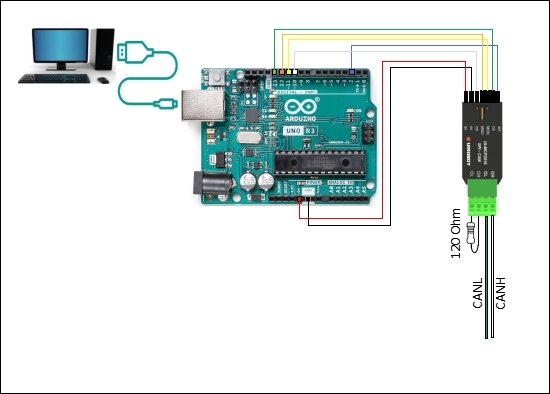
### Step-by-Step Setup
#### Step 1: Install Arduino IDE
Download and install the Arduino IDE from [arduino.cc](https://www.arduino.cc/en/software/).
#### Step 2: Download Sample Code
Download the sample code package:
- Basic: [Arduino_Cpp_Mcp2515_UIM342_AN250901.zip](https://www.uirobot.com/uploads/files/Arduino_Cpp_Mcp2515_UIM342_AN250901.zip)
- Change Node ID: [Arduino_Cpp_Mcp2515_UIM342_ChangeNodeID_AN250902.zip](https://www.uirobot.com/uploads/files/Arduino_Cpp_Mcp2515_UIM342_ChangeNodeID_AN250902.zip)
- Multi-Motor: [Arduino_Cpp_Mcp2515_UIM342_Multiple_AN250903.zip](https://www.uirobot.com/uploads/files/5019760d5da5aa92d6a72ffccda72ad6.zip)
#### Step 3: Install Required Libraries
1. Open Arduino IDE → Sketch → Include Library → Manage Libraries
2. Search for **MCP2515** or **MCP_CAN** library by coryjfowler
3. Click Install
#### Step 4: Upload Code
1. Open the downloaded `.ino` file in Arduino IDE
2. Select **Tools → Board → Arduino UNO**
3. Select **Tools → Port → (your COM port)**
4. Click **Upload** button
#### Step 5: Open Serial Monitor
1. Tools → Serial Monitor (or Ctrl+Shift+M)
2. Set baud rate to **115200**
3. Observe motor control messages
---
## Section 2: Direct Wiring — Pulse-Direction (UIM344)
### Background
The UIM344 is a closed-loop stepper motor driver that accepts standard pulse-direction signals. Connect Arduino digital pins directly to the motor's PLS (Pulse), DIR (Direction), and ENA (Enable) inputs — no CAN module required.
### Required Hardware
| Item | Qty | Description |
|------|:---:|-------------|
| Arduino UNO / Mega | 1 | Main controller board |
| UIM344 Series Motor | 1+ | Pulse-direction stepper motor |
| 24V DC Power Supply | 1 | For motor power |
### Wiring
```
Arduino UNO UIM344 Motor
+--------------+ +--------------+
| Digital Pin |----->| PLS (Pulse) |
| Digital Pin |----->| DIR (Direction)|
| Digital Pin |----->| ENA (Enable) |
| GND |----->| GND |
+--------------+ +--------------+
|
24V DC Power Supply
```
### Step-by-Step Setup
#### Step 1-3: Same as Section 1
Download code from:
- Basic: [Arduino_Cpp_UIM344_AN250904.zip](https://www.uirobot.com/uploads/files/Arduino_Cpp_UIM344_AN250904.zip)
- High Speed: [Arduino_Cpp_UIM344_HighSpeed_AN250911.zip](https://www.uirobot.com/uploads/files/Arduino_Cpp_UIM344_HighSpeed_AN250911.zip)
- Multi-Motor: [Arduino_Cpp_UIM344_Multiple_AN250905.zip](https://www.uirobot.com/uploads/files/Arduino_Cpp_UIM344_Multiple_AN250905.zip)
---
## Section 3: Arduino Ethernet + UIM2523 → CAN Bus
### Background
The UIM2523 is an Ethernet-to-CAN gateway. Connect an Arduino with Ethernet shield to control CAN bus motors over a network.
### Required Hardware
| Item | Qty | Description |
|------|:---:|-------------|
| Arduino Ethernet / Uno+Ethernet Shield | 1 | Controller with network |
| UIM2523 | 1 | Ethernet to CAN gateway |
| UIM342 Series Motor | 1+ | CAN bus smart motor |
| Network Switch | 1 | For network connection |
| UIC320A | 1 | USB-CAN for debugging (optional) |
### Wiring
```
Arduino Ethernet UIM2523 UIM342 Motor
+----------------+ +-------------+ +------------+
| RJ45 Port |---| RJ45 Port | | |
| (to Switch) | | CANH ---+----->| CANH |
| | | CANL ---+----->| CANL |
| | | V+ ---+----->| V+ (24V) |
| | | V- ---+----->| V- (GND) |
+----------------+ +-------------+ +------------+
| |
Network Switch |
| |
PC (for monitoring)
```
### Step-by-Step Setup
1. Connect hardware as shown in the wiring diagram
2. Configure PC IP to the same subnet as UIM2523
3. Upload to Arduino:
- Basic: [ArduinoETH_Cpp_UIM2523_UIM342_AN250906.zip](https://www.uirobot.com/uploads/files/ArduinoETH_Cpp_UIM2523_UIM342_AN250906.zip)
- Multi-Motor: [ArduinoETH_Cpp_UIM2523_UIM342_Multiple_AN260415.zip](https://www.uirobot.com/uploads/files/ArduinoETH_Cpp_UIM2523_UIM342_Multiple_AN260415.zip)
- Set IP: [ArduinoETH_Cpp_UIM2523_UIM342_SetIP_AN250907.zip](https://www.uirobot.com/uploads/files/ArduinoETH_Cpp_UIM2523_UIM342_SetIP_AN250907.zip)
4. Open Serial Monitor to verify
---
## Download All Sample Codes
| Application Note | Description | Download |
|-----------------|-------------|----------|
| AN250901 | UIM342 basic CAN control (MCP2515) | [Download](https://www.uirobot.com/uploads/files/Arduino_Cpp_Mcp2515_UIM342_AN250901.zip) |
| AN250902 | UIM342 change Node ID (MCP2515) | [Download](https://www.uirobot.com/uploads/files/Arduino_Cpp_Mcp2515_UIM342_ChangeNodeID_AN250902.zip) |
| AN250903 | UIM342 multi-motor (MCP2515) | [Download](https://www.uirobot.com/uploads/files/5019760d5da5aa92d6a72ffccda72ad6.zip) |
| AN250904 | UIM344 basic pulse-direction | [Download](https://www.uirobot.com/uploads/files/Arduino_Cpp_UIM344_AN250904.zip) |
| AN250911 | UIM344 high-speed pulse-direction | [Download](https://www.uirobot.com/uploads/files/Arduino_Cpp_UIM344_HighSpeed_AN250911.zip) |
| AN250905 | UIM344 multi-motor pulse-direction | [Download](https://www.uirobot.com/uploads/files/Arduino_Cpp_UIM344_Multiple_AN250905.zip) |
| AN250906 | UIM342 Ethernet (UIM2523) basic | [Download](https://www.uirobot.com/uploads/files/ArduinoETH_Cpp_UIM2523_UIM342_AN250906.zip) |
| AN260415 | UIM342 Ethernet (UIM2523) multi-motor | [Download](https://www.uirobot.com/uploads/files/ArduinoETH_Cpp_UIM2523_UIM342_Multiple_AN260415.zip) |
| AN250907 | UIM2523 set IP address | [Download](https://www.uirobot.com/uploads/files/ArduinoETH_Cpp_UIM2523_UIM342_SetIP_AN250907.zip) |
---
## Video Tutorial
▶️ Watch on YouTube: [How to Control the UIM344 Series Closed-Loop Pulse-Direction Motor Using an Arduino](https://www.youtube.com/watch?v=iZMjSs_pVa0)
▶️ Watch on YouTube: [How to Control UlM342 CANBUS Servo Stepper Smart Motors Using Arduino+ Ul-MCP2515](https://www.youtube.com/watch?v=GLb7F3KFpPc)
▶️ Watch on YouTube: [Missing Step Self-Compensation for UIM344 Closed-Loop Pulse-Direction Control Motor](https://www.youtube.com/watch?v=H2et6Vd74zg)
---
## Related Documents
- [UIROBOT Code Examples Overview](/docs/code-examples-overview)
- [UIM342 CAN Bus Motor Controller](/docs/uim342)
- [UIM344 Pulse-Direction Motor Controller](/docs/uim344)
- [UI-MCP2515 SPI to CAN Module](/docs/UI-MCP2515)
- [UIM2523 Ethernet to CAN Gateway](/docs/uim2523)
- [Quick Start Guide](/docs/quick-start)
---
*Last updated: 2026-06-25 | Based on Application Notes AN250901-AN260415*